The GoBear Business Guide for Retail Operators
One handbook covering everything an independent operator needs to buy, launch and run GoBear self-service customization kiosks: the market numbers, the equipment system, the operating playbook, and results from operators already running our machines in four countries.
What This Handbook Covers
This guide was prepared for independent retail operators who plan to purchase and operate GoBear self-service printing kiosks. It brings the industry case, the full equipment system, stage-by-stage operating standards, the marketing system, our support commitments and the long-term product roadmap into one document.
The industry window
2025 to 2026 is the window for offline instant print-on-demand phone cases. Global phone accessories grow at 6.8% a year, and the print-on-demand market at 19.5%.
Two core machines
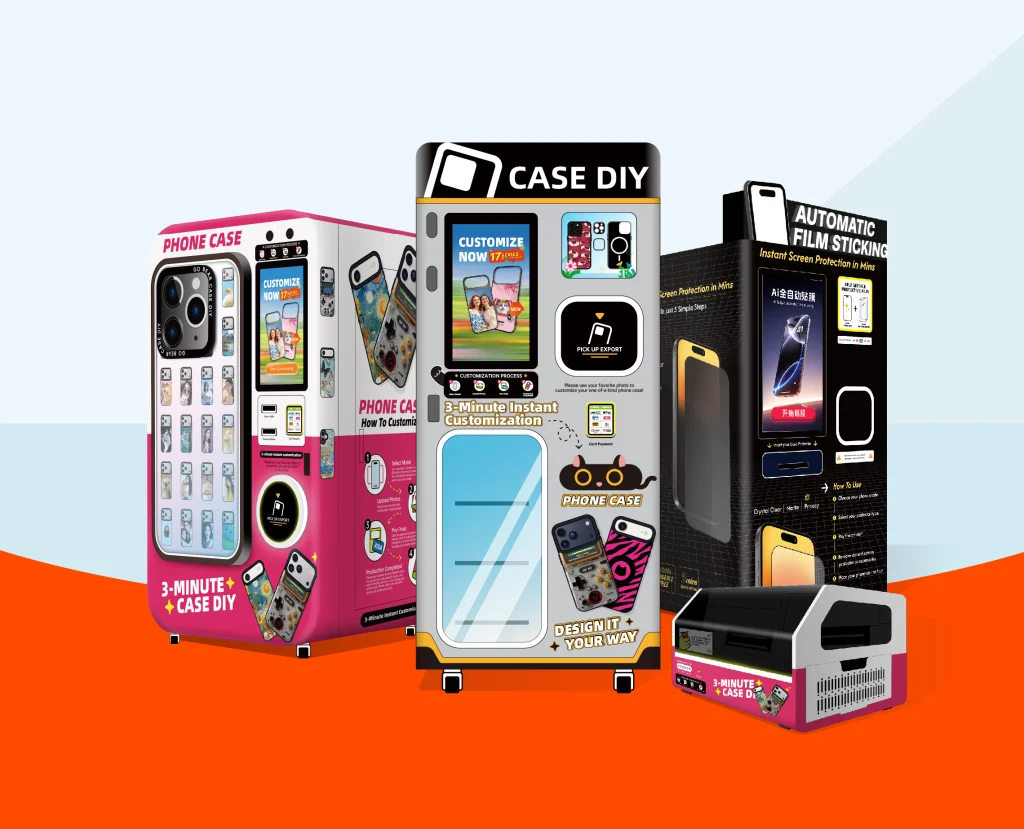
A UV custom phone case printing kiosk and an automatic screen protector machine. Run one on its own or run both together to lift average spend per visit.
The business model
Unmanned, open around the clock. You stock blank cases instead of finished goods, so inventory risk stays low and single-product margins stay high.
Who this fits
Operators with access to high-traffic venues: shopping malls, campuses, scenic spots and airports.
What we provide
Pre-launch guidance, a 7-day opening plan, a global marketing toolkit, 24/7 remote technical support, maintenance standards and 90 days of hands-on operation support after launch.
Where it leads
An online unified ordering platform and multi-category POD expansion are in development, designed to widen each kiosk's revenue sources over time.
Why Now: The Numbers Behind Instant Customization
Phone cases stopped being protection-only accessories. Buyers treat them as personal fashion items and pay premium prices for designs nobody else has. Custom cases are the fastest-growing segment inside the phone accessory market.
What shoppers run into today
- Online custom platforms take days to deliver. A traveler, a new-phone buyer or a gift shopper cannot wait.
- Hand-applied screen protectors depend on the clerk's skill. Bubbles, dust and crooked film are common.
- Finished accessories on store shelves look the same everywhere, with few genuinely personal options.
What a GoBear kiosk does instead
- Design, printing and delivery happen in one machine, in 2 to 3 minutes, right where the customer stands.
- Automatic dust removal and mechanical alignment make every film application come out the same way.
- Templates, personal photos, text and stickers let each buyer leave with a one-of-a-kind product.
Prime location × reliable GoBear hardware × smart local marketing = stable daily income
Securing a strong venue early builds a position competitors will find hard to dislodge in your area.Four roles in this industry
R&D and production of kiosks, the cloud management system, global supply of blank shells and ink, plus the full operating and marketing support package.
Purchases the equipment, signs venue agreements, handles restocking, operation and marketing, and keeps the retail-end sales profit.
Malls, campuses, scenic spots and airports provide the offline traffic space and receive fixed rent or a sales share.
Design, print and apply films on the machine by themselves, and their orders generate the operator's revenue.
Not One Machine. A Complete Operating System.
GoBear is built for operators without a technical background. Four modules work together: the hardware, the cloud dashboard, the marketing toolkit and the global support team.
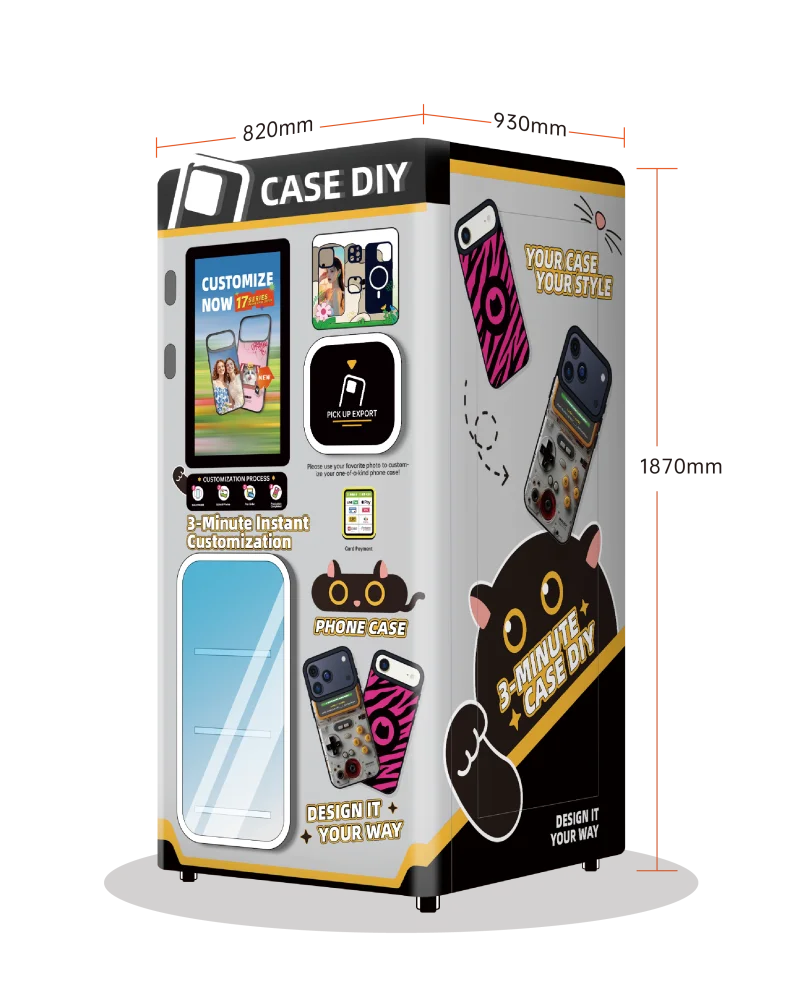
K77 UV Custom Phone Case Kiosk
The customer journey, from blank shell to finished case:
- Select the phone model on the touchscreen
- Design: pick official templates or upload personal photos, add text and stickers
- Preview the result and pay by card, QR code, NFC, Apple Pay or Google Pay
- The machine prints the full-color case in 2 to 3 minutes
- Compatible with 500+ mainstream phone models
- Holds up to 1,140 blank cases on board
- Large multi-language touchscreen with one-tap language switching
- Nayax-compatible multi-channel payment system
- Wi-Fi / 4G / 5G connection for cloud updates and monitoring
- Every unit passes a 48-hour nonstop printing test before shipping, plug-and-play on arrival
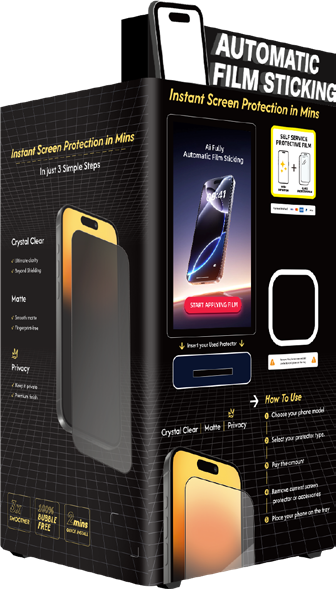
108T Automatic Screen Protector Machine
The customer journey, from bare screen to fitted film:
- Select the phone model, or scan the phone to identify it automatically
- Pay on the touchscreen
- Place the phone into the cabin following the on-screen prompt
- The machine removes dust, aligns and applies the film in about 120 seconds
- Automatic dust removal plus precise mechanical positioning
- Avoids the bubbles, offset and dust problems of manual application
- Standardized, professional-grade results every time
- Works alone or paired with the K77 printing kiosk
When the two machines stand side by side, reference data from operating venues shows each machine's order volume rising by 30% to 50%. The pair attracts more passers-by and raises the average amount each customer spends in one visit.
Remote Management From Your Phone
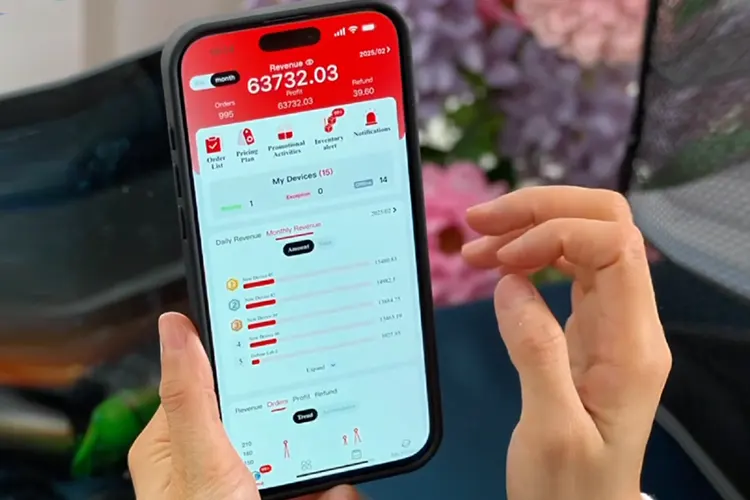
Log in from a phone or computer to manage one kiosk or many, across different cities:
- Live sales volume and daily gross profit statistics
- Inventory monitoring with automatic low-stock alerts for blank shells and ink
- Remote one-tap updates of design templates, retail pricing and on-screen promotions
- Automatic fault alerts with remote diagnosis and troubleshooting
Launch-Ready Materials, Included Free
Every equipment order includes a complete set of editable marketing materials:
- Promotional short videos and printable posters
- Social media hashtags and holiday trending design templates
- Venue negotiation scripts for rent and revenue-share talks
- A 30-day content calendar, so day one looks professional
24/7 engineer support
Round-the-clock remote technical engineers for every equipment order.
Training & onboarding
A complete pre-recorded training video library plus one-to-one live remote onboarding.
Lifetime upgrades
Free cloud system upgrades and continuous updates to the global design template library.
Regional spare parts
Spare parts warehouses in major global markets shorten the hardware replacement cycle.
Five Steps From Empty Venue to Opening Day
Step-by-step guidance from venue selection to the first day of sales, so nothing gets missed before launch.
Site selection & venue evaluation
Start with venues where young consumers dominate: shopping malls, university campuses, international airports and tourist attractions. The ideal venue scores well on this checklist:
Our Site Scoring Assessment Sheet turns venue comparison into quantitative scores instead of gut feeling.
Kiosk configuration & customization
Every parameter is confirmed before factory production so the machine fits your local market:
Consumables & starter inventory
The standard starter package we suggest:
The GoBear operations team matches quantities to the phone models actually popular in your market.
Payment system activation
Our technical team handles the full integration between the kiosk and your local payment gateway or the Nayax unified platform. Activation typically takes 5 to 7 working days, and none of the technical work falls on the operator.
Pre-launch buzz
Build local anticipation before the machine arrives:
Done well, the preheat gives you a waiting line of curious customers on day one.
| Venue agreement mode | How it works | Best for |
|---|---|---|
| Fixed monthly rent | A predictable monthly cost. All sales above that belong to the operator. | Venues with stable foot traffic and reasonable rent. |
| Revenue share | No fixed rent. The venue takes an agreed percentage of monthly sales. | Newer venues where traffic is still unproven and risk is higher. |
| Our advice | Model both modes against your projected monthly sales and pick whichever costs less overall. | |
The 7-Day Grand Opening Plan
A day-by-day opening script that builds your first customer base and your first stack of social proof fast, so daily orders stabilize early.
Install the machine, debug power and network, print 3 to 5 sample cases for display and publish the first opening video on your social channels.
Offer free custom prints to 10 to 20 venue staff, students and mall employees. Invite them to post their experience, which becomes natural advertising material.
Work with local creators who have 1,000 to 5,000 followers. Film the production process and give their audiences exclusive 10 to 15% discount codes so results can be tracked.
Launch a two-day promotion: the first 100 orders get the second item at 50% off, ready to gift. Loop the four-step how-to video on the machine's touchscreen.
Collect every customer photo and short video from the opening days and repost them from your own accounts to keep foot flow coming.
Cap the free trials
Limit free prints per day and per phone model so no single model's blank stock runs out early.
Fix the time window
Run free trials in one defined time slot per day. Staffing costs drop when attention is concentrated.
Trade prints for posts
Give the free print in exchange for a UGC post. The cost turns into marketing reach instead of a loss.
Launch week targets
Maintenance Designed for Minimum Labor
No full-time on-site staff and no technical background required. Follow the standard cycle below and the machines take care of the rest.
K77 Care Schedule
Wipe down the machine, clean the blank shells, then check inventory data and restock cases and ink when the system sends low-stock alerts.
Add lubricating oil to the internal guide rail once.
Ink cartridge: every 2 to 4 months. UV printhead: every 24 months.
108T Care Schedule
Restock tempered film when the cloud system flags a shortage.
Empty the waste film bin. Remove the brush, rinse it with water and clear the dust.
Cleaning cloth: replace every 300 orders. Cleaning liquid: refill every 90 days, roughly 1,000 orders. Handheld vacuum clean of internal dust: every 60 days.
The Marketing System That Keeps Orders Coming
Two operators in equally good venues can end up with very different results. Marketing is the difference, and the GoBear system hands you the frameworks for both organic content and paid ads.
Experience showcase
Short videos of the 2-minute printing process. Simple, satisfying, shareable.
Emotional stories
Cases for couples, graduation keepsakes, travel souvenirs. Scene-driven content people tag their friends in.
Local culture
City landmarks, school logos, local sports teams. Templates that only make sense in your town.
Craftsmanship
Close-ups of color accuracy, detail precision and long-term wear resistance.
Weekly content rhythm
- 3 vertical short videos each week (Reels / TikTok)
- 2 static photo posts each week
- Daily stories: live printing shots and customer reactions
- 2 live on-site demonstrations each month
Geotargeted paid ads
- Fence radius of 3 to 5 km around the venue
- Recommended budget: USD 5 to 10 per day
- Target interests: DIY crafts, mobile photography, fashion accessories, local tourism
- Standard ad copy templates included in the toolkit
UGC incentive
Customers who tag the venue account when posting get 10% off their next order. The best customer designs rotate on the machine's touchscreen, which pushes more people to share.
Stay compliant
Tell customers clearly how their uploaded photos will be used, per local privacy laws. The backend blocks copyrighted, portrait-right and sensitive designs with a one-tap filter.
Seasonal campaign templates cover Valentine's Day, graduation season, tourist souvenir promotions and mall weekend flash sales. Each one is editable, so you can swap in local holidays and materials.
Read Your Numbers. Know Your Next Move.
The cloud dashboard unifies data across all your machines. For operators ready to add kiosks after a stable first location, the system sets clear judgment standards.
Add kiosks in the same venue or in a nearby high-traffic location.
Improve machine visibility and lighting, refresh design templates or adjust pricing to lift conversion.
Relocate the kiosk to a better venue, or renegotiate rent and share terms with the property side.
If your venue runs low on traffic
- Push location-tagged short videos daily to pull nearby users to the store
- Run joint promotions with surrounding shops, universities and scenic spots to fill off-peak hours
- Add low-cost entry templates to lower the decision threshold
When you expand to more machines
- Copy the proven best-selling templates from machine one to every new unit
- Use your first stable kiosk as the case study to negotiate better rent on the next spot
- Reinvest the first two months of profit into machine number two
From 1 kiosk to 3-5 profitable machines within 150 days
The expansion path operators with normal venue conditions have followed.What Stands Behind Every Machine We Ship
Full-lifecycle hardware warranty
Whole-machine warranty terms, printhead and moving-part policies, consumables specifications (ink, wiper, filter), paid maintenance pricing and the scope of free remote troubleshooting. Full written terms are provided with every order.
Production, logistics & customs
Complete export documents for sea and air shipment: commercial invoices, packing lists, test reports and supporting customs materials. Every kiosk ships in a shock-resistant solid wooden case built for long-haul transport.
International certifications
Our full product line holds TUV, CB, CE, FCC, PSE, KC, RCM, RoHS and MSDS certifications. The scope covers the kiosk equipment, the blank phone case shells and the UV printing ink. Our machines have been exported to 60+ countries and meet the market access requirements of global retail venues.
90 days of post-launch accompaniment
After the machine goes live, the operations team stays with you one-to-one for 90 days: drafting your opening week activity plan, guiding your first batch of marketing videos and copy, reviewing operating data weekly with pricing and template suggestions, and pushing seasonal promotion plans matched to your local holidays.
Editable Templates, Ready From Day One
Every material below ships with the equipment, is fully editable and supports multi-language localization for your market.
Quantitative scoring tool for comparing venues objectively.
Blank financial projection tables you fill with local pricing and costs.
The detailed day-by-day launch checklist from section 04.
Ready-made video and picture ideas for a full month of posting.
Monthly sales and inventory tracking template for each kiosk.
Standard English dialogue for rent and revenue-share talks with malls.
200+ printable custom case designs, updated with global seasons.
All materials support localization edits for different regions.
Four Markets, Four Business Models, Real Operating Numbers
Four representative operators, each with a different cooperation model: self-operated, franchise, venue co-branding and IP licensing. Pricing and profit figures below are reference data from each market.
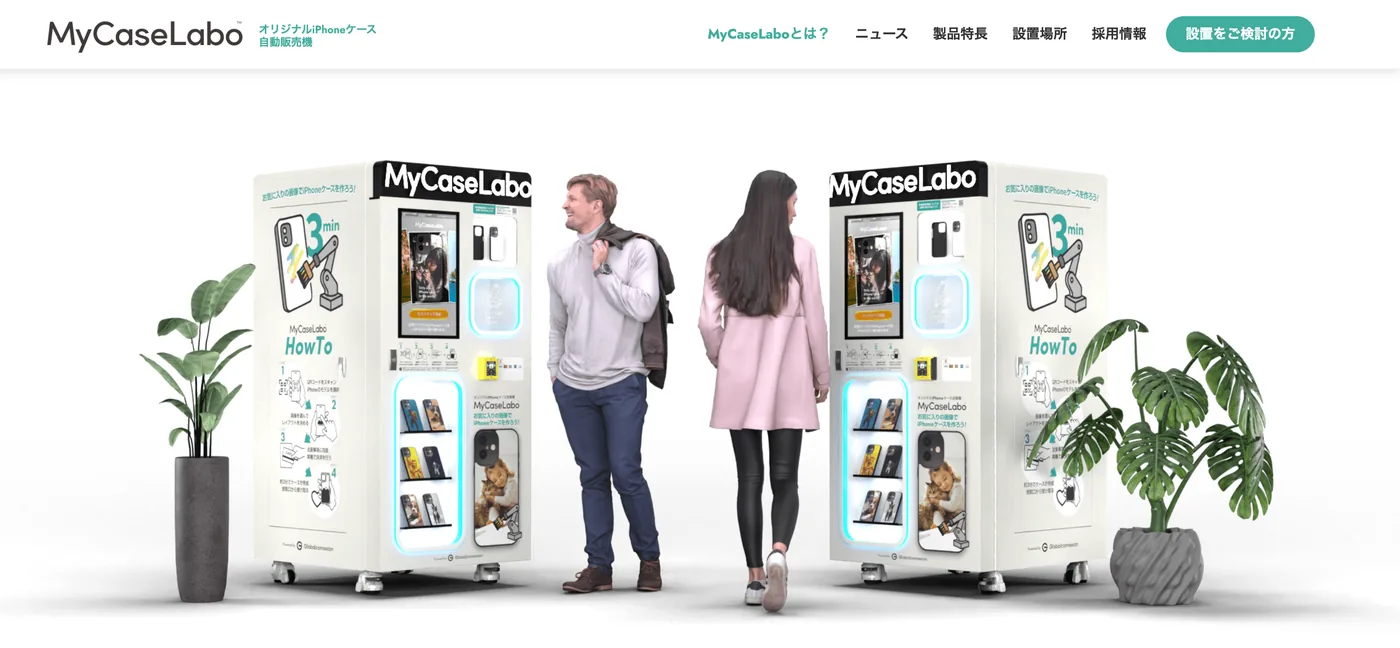
MyCaseLabo + Filmlabo
100% self-operated, dual-machine model
Parallel editing on phone and QR code avoids screen queuing at peak hours. Multi-language interface (JP/EN/CN/KR) serves tourist crowds. Covered by Nikkei, TBS and Fuji TV.
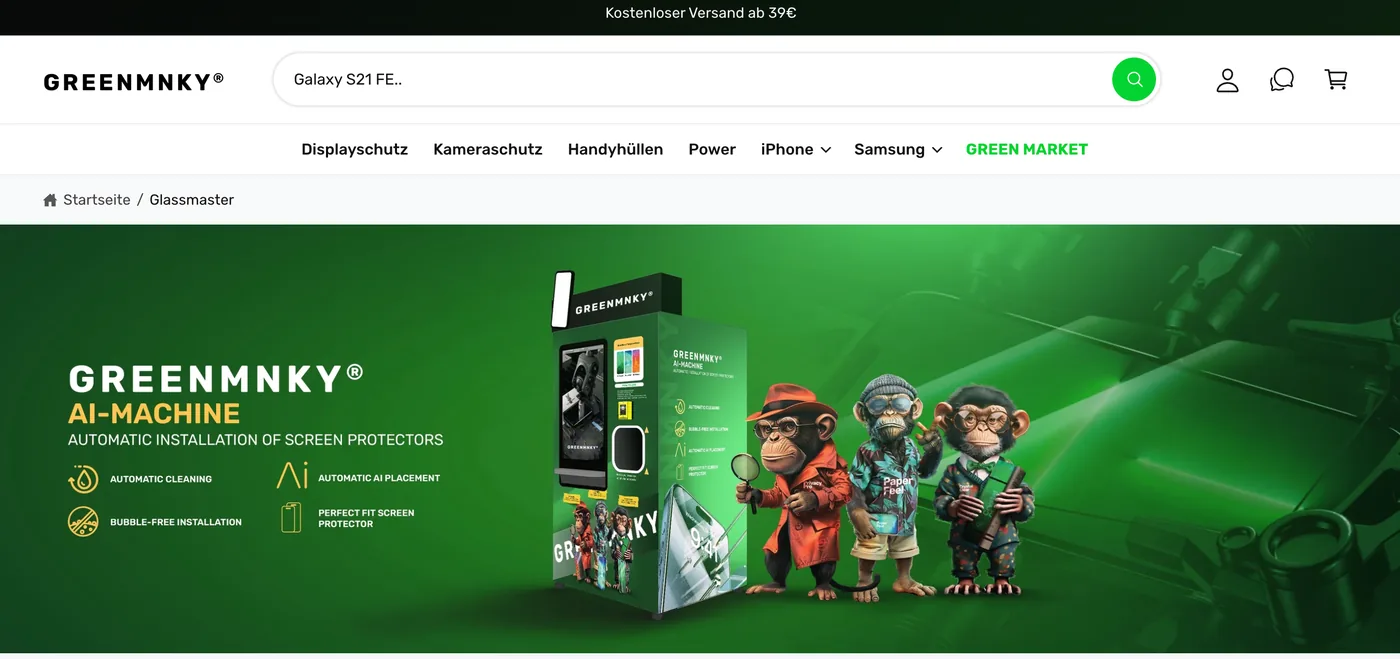
GreenMNKY (CaseMaster + Glassmaster)
Self-operated flagships + franchise, dual mode
The franchise package covers machines, template library, backend systems, venue scripts and training, backed by a regional spare parts warehouse in Germany. Compact machine size fits narrow mall walkways.
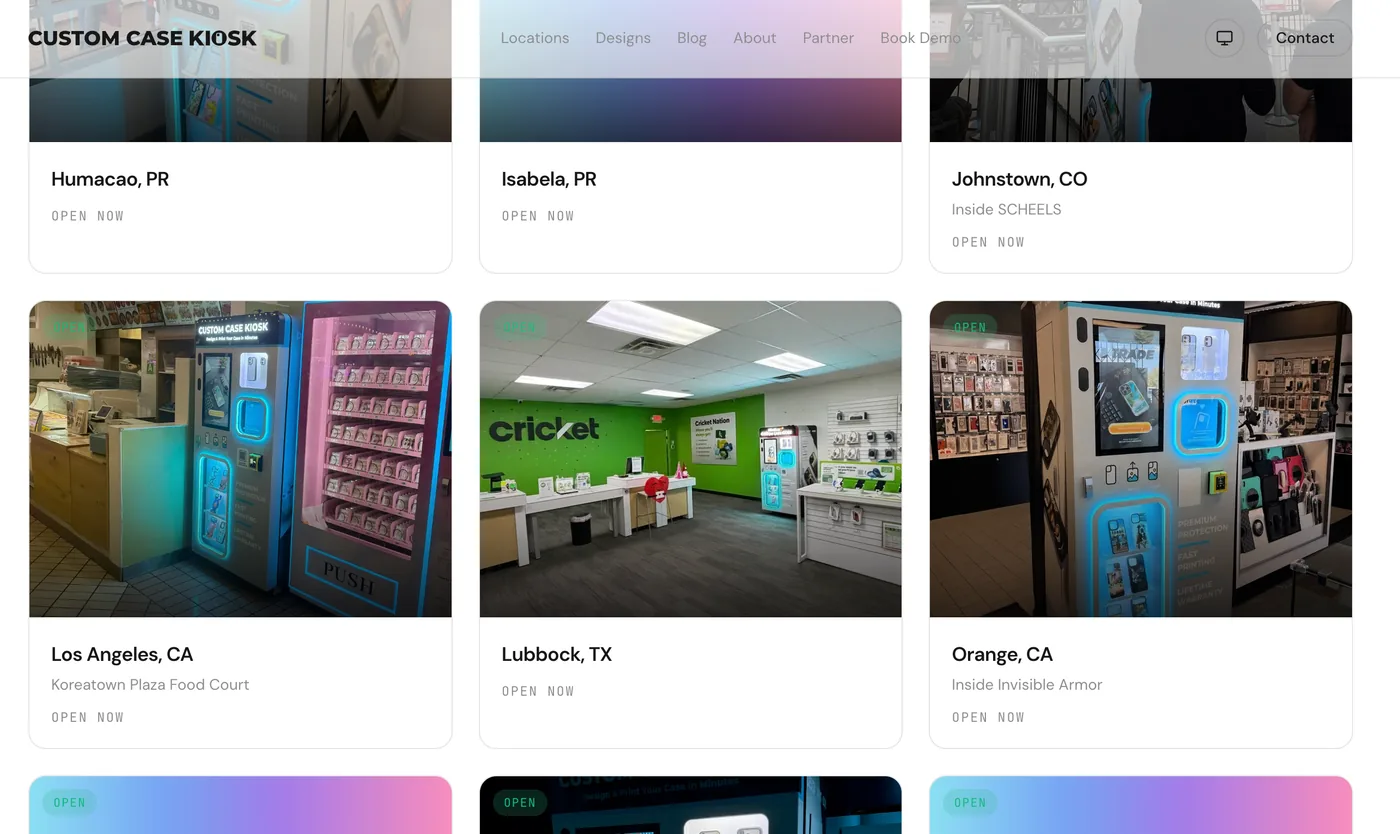
Custom Case Kiosk
Self-operated + mall venue revenue-share co-branding
Revenue-share agreements with mall groups remove fixed rent risk for new venues. The cloud backend shares live sales data with the mall for settlement. TikTok and Instagram UGC incentives are standard practice.
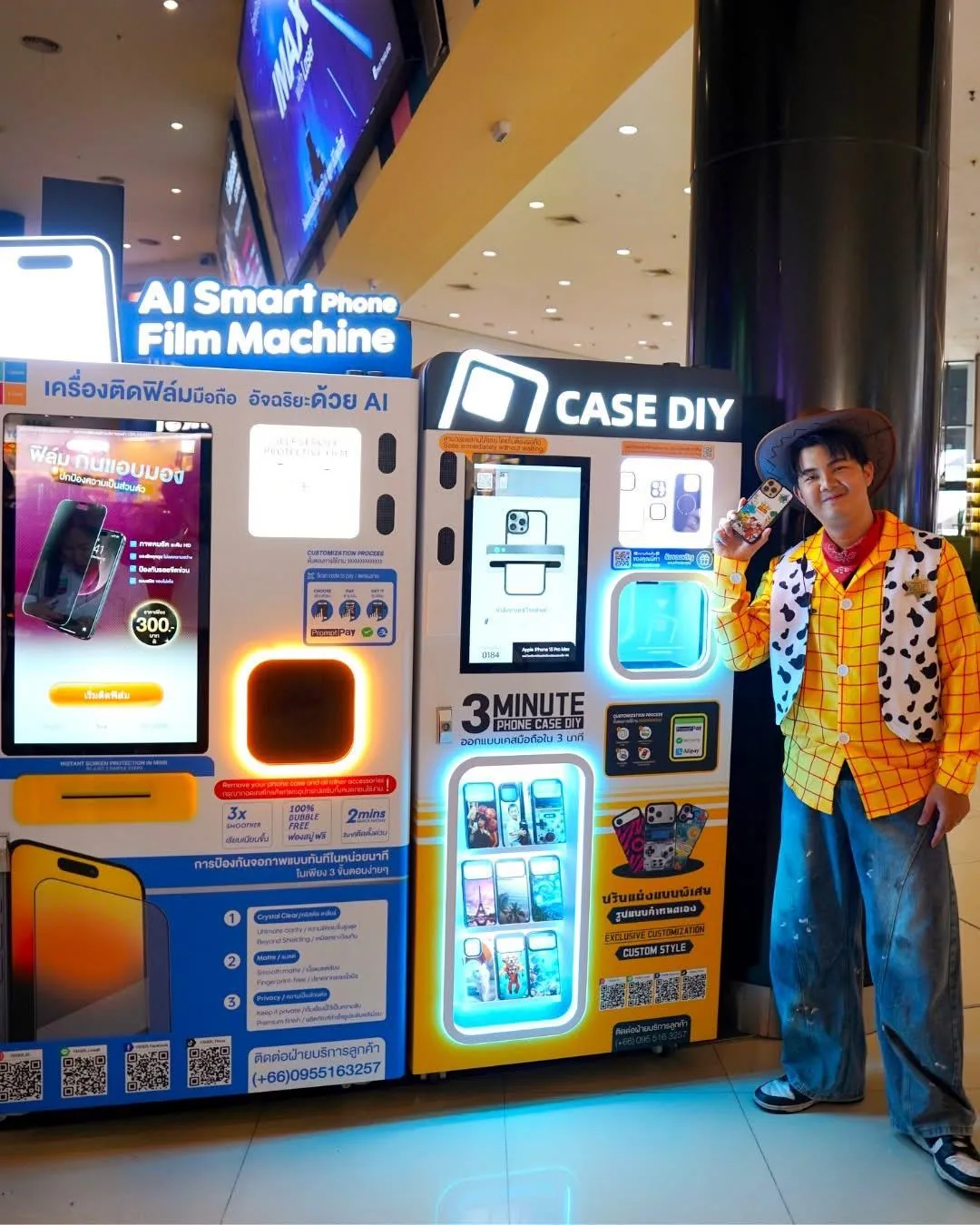
Veger Thailand
Brand licensing + IP authorized template operation
Exclusive Thai cultural, festival and landmark IP templates set the brand apart from generic competitors. An annual licensing fee replaces the cost of building a brand from zero, and the remote mobile backend suits markets with tight labor budgets.
Detailed monthly revenue breakdowns and full-cycle ROI tables for these four brands will be added to this page once the data is verified. The figures above are the reference ranges currently available from each market.
Where This Business Goes Next
What you invest in today is one kiosk. The plan below is how that kiosk's earning boundary keeps widening.
Stabilize hardware & offline operation
Complete equipment stability iteration, build out the global spare parts service network, standardize the operating and marketing systems, and help the first wave of operators run profitable model venues in each region.
Online + offline unified orders
Launch a global consumer platform where users design cases online and pick them up at the nearest GoBear kiosk. Online traffic feeds offline machines, and operators open their own storefront pages to take orders from nearby users.
More categories, global designers
Extend to high-margin POD products like magnetic card holders and power banks. Bring independent designers and regional IP into the template library, and form a dense unmanned printing network across major business districts worldwide.
All planning items above are being rolled out step by step, and supporting materials will be published as each stage lands.
From Decision to First Orders: The Full Timeline
Inspect venues, sign the venue cooperation contract, confirm equipment configuration.
Place the equipment order, confirm the payment system integration plan, prepare the initial inventory list.
Equipment production, logistics delivery, pre-launch marketing preheat.
Equipment arrives on site. Installation, debugging and training completed.
Run the 7-day opening plan and accumulate the initial customer base.
Review operating data, optimize pricing and templates, and evaluate adding the next machine.
The quick start checklist
Frequently Asked Questions
A high-traffic venue such as a mall, campus, airport or tourist attraction, with stable power and network at the spot, plus a starting inventory of around 1,000 blank cases. GoBear handles machine configuration, payment system integration and operator training before launch.
The K77 prints a full-color custom phone case in 2 to 3 minutes. The 108T applies a tempered glass screen protector, including automatic dust removal and alignment, in about 120 seconds.
Pre-launch preparation guidance, a 7-day opening plan, a free editable marketing toolkit, 24/7 remote engineer support, a training video library with one-to-one onboarding, lifetime cloud system upgrades, regional spare parts warehouses, and 90 days of one-to-one operation accompaniment after launch.
Each machine works standalone. When the K77 and the 108T are placed side by side, reference data from operating venues shows each machine's order volume rising 30% to 50%, driven by higher average spend per visit.
No. All income figures, ROI ranges and order volumes in this guide are theoretical estimates based on historical market cases. Actual results depend on venue foot traffic, local pricing, marketing execution and equipment maintenance.
Ready to Claim Your Venue?
Get the complete business guide, factory pricing and a machine configuration matched to your market. From installation to profit, we're with you every step of the way.