How Much Money Do I Need to Start a Phone Case Business in USA
Phone Case Business Startup Cost: Explore investment from $500 (POD) to $284K (retail). Get B2B cost models and rapid RO...

I'm the COO of GOBEAR. We help entrepreneurs, mall operators, 3C mobile stores, event venues, and campus retailers tap into high-margin, low-maintenance vending models.
This analysis benchmarks essential supplies against operational realities. We detail how blank cases, ink at $0.05 per print, and maintenance contribute to a total consumable cost of $1.35–$2.08 per case, securing scalable profit.
To run a profitable phone case vending machine, operators need a constant supply of blank cases, inks, cleaning supplies, and maintenance parts. Managing these consumables efficiently keeps machines running and revenue flowing.
A phone case vending machine operator must regularly procure and manage several critical items. These ensure smooth operation and consistent revenue.
Operators select blank phone cases based on material, printing method, and desired protection. TPU offers flexibility, PC provides rigidity, and hybrids blend both for optimal performance.
UV printing ink systems are standard for phone case vending, using CMYK, white, and optional gloss for durability. Consumption is low, about $0.05 per print, with refills tied to sales volume.
Protective materials are critical consumables for phone case vending machines. They ensure cases stay pristine, enhancing product durability and customer satisfaction.
Protective film sheets and overlays bond to case surfaces, maintaining design clarity with high optical transparency. Scratch-resistant transparent films preserve print visibility and reduce wear from frequent handling in vending environments. Adhesive-backed films for transfer or layered finishes require compatibility with common case substrates, including TPU and PC. Model-specific film sizes streamline operations, reducing waste and speeding up restocking by aligning with phone case inventory.
Clear protective coatings seal printed graphics and enhance abrasion resistance on cases with high touch frequency. UV-cured topcoats integrate well into vending workflows, offering quick curing times and faster product turnaround. Hardcoat layers provide premium durability. These are ideal for cases positioned as longer-lasting or higher-end products. Businesses integrate protective films and coatings into inventory alongside blank cases, recognizing their impact on product quality.
When custom printing is involved, the protective layer must not haze, distort, or lift the printed image. Adhesion testing is vital for mixed-material inventory, as different case surfaces may require specific film or coating formulations. Fast-curing protective coatings are better suited to automated or semi-automated workflows than slow-dry alternatives.
Several factors drive material selection:
When planning purchases, follow these guidelines:
Packaging supplies like boxes, bags, and labels are critical for protecting cases, ensuring smooth machine operation, and presenting a professional product.
Boxes provide physical protection for printed cases during storage, transport, and vending, guarding against scratches, dust, and damage. They ensure smooth vending, as they present a consistent, rigid form factor that works reliably with spirals, shelves, or drop mechanisms. Boxes also deliver a retail-ready look, which enhances perceived value and offers space for branding, pricing, and model visibility. They help standardize inventory units, simplifying counting, loading, and planogram design for your machine.
The preferred box type is folded carton boxes made from paperboard, ideally in one primary standard size. The paperboard should have a thickness between 14–20 pt for enough rigidity without being too bulky. For closures, use simple tuck or snap designs. These are fast to assemble and keep labor costs low.
Box footprint must match the machine’s lane dimensions precisely to prevent jams. You might consider 1–2 height variations for different case types. For design, leave room for your brand logo, a basic color palette, and key functional information like the device model and QR codes.
Order boxes in hundreds to thousands of units for better pricing and a consistent supply. Maintain 1–3 months of projected sales in box inventory as a buffer stock. Source boxes from machine manufacturers, specialized phone case packaging suppliers, or local printers.
Bags protect the phone case and its printed surface from dust, particles, and minor abrasion during storage and vending. They keep the product looking clean and 'new'. If you don't use boxes, bags become the primary container. We recommend clear poly bags (PE or PP) with a 1.5–3 mil thickness when you use them inside boxes. If you only use bags, go with a thicker, stiffer material and test them thoroughly in your vending machine.
Bag dimensions should comfortably fit the case, minimizing excess material. For sealing, use self-adhesive flaps or simple heat seals for fast packing. Make sure bags don't trap too much air. Bags also shield freshly printed cases from surface contact and separate them from inserts, especially for high-gloss finishes.
Labels provide immediate, visible identification of the phone model and case variant for customers and staff. Labels with barcodes or QR codes support scanning for inventory management, tracking sales, and monitoring stock levels. Clear, standardized labels reduce misloads and mismatches between the machine's screen options and physical products, improving operational efficiency.
Essential label content includes the phone model name and case type in large text on the front or top face. The side or back face needs a barcode or QR code. Use large, bold, high-contrast text and maintain consistent placement and orientation on every box or bag. Labels should face outward when loaded so staff and customers see the same information. Standard paper labels work well indoors; use synthetic film for harsh environments with permanent adhesives.
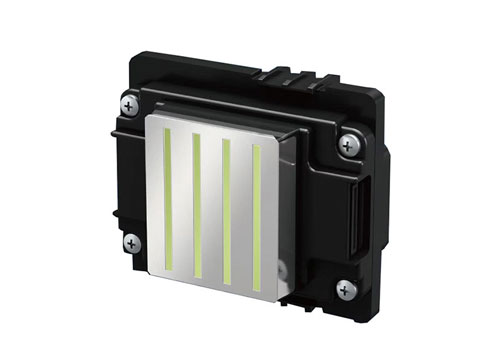
Keeping your machine running means focusing on print heads and cleaning supplies. These are critical for uptime, print quality, and managing your cost per case.
Print heads are the core wear component in integrated phone case printing vending machines. They control droplet placement, color accuracy, and fine detail for each case you print. If they degrade, you get banding, missing lines, color shifts, and rejected prints, directly impacting revenue and customer experience.
A print head typically lasts 6–18 months. This lifespan depends on your print volume, ink chemistry, and how well you follow cleaning and parking procedures. High-traffic machines print more cases daily, so they hit wear limits faster and need replacements more often.
Treat print heads as a planned consumable. You need to calculate the cost per print from the head by dividing the print head cost by its expected total prints. Factor this into your case selling price so you budget for replacement as a normal operating cost, not a surprise expense.
Keep at least one spare print head per machine model on hand. For multi-unit operations or high-traffic sites, you need two or more spares per model, especially if supplier lead times are long. Store these spare heads sealed and dust-free in a clean, temperature-stable environment. Avoid humidity and direct sunlight. Do not open them until installation, as even a tiny particle on a nozzle can severely degrade print quality.
Follow manufacturer instructions for handling, cleaning, and parking. Use built-in automatic cleaning cycles regularly to prevent ink drying or nozzle clogging. When the machine is idle, use the head parking or storage procedure. This means flushing the head with approved cleaning solution and capping it to keep nozzles moist and protected.
For daily care, power off the machine before touching internals to avoid electrical damage or head crashes. Gently wipe the print head surface with a lint-free cloth lightly dampened with 70% isopropyl alcohol, unless the manufacturer specifies a different cleaner. Never use paper towels; they shed lint and cause clogs.
Inspect and calibrate print heads quarterly. Check nozzle integrity for scratching, ink leakage, or physical damage. Replace heads if you see severe issues. Also, run resolution, color accuracy, and alignment calibration for the full printing system. Annually, replace ink pipes and sealing parts that feed the print head, and check the print control board and precision motors that position the head.
Replace the print head when:
Maintain a maintenance log. Document the install and removal dates for each print head, estimate print volumes, and note cleaning cycles and any issues encountered. This helps you predict when a head will reach its wear limit and refines your cost-per-print calculations.
Cleaning supplies are ongoing consumables. They prevent downtime, clogged heads, payment failures, and dirty user interfaces. They directly impact print quality and customer trust in your machines.
Keep these core cleaning consumables in stock for each machine and field technician:
Maintain a 1–3 month supply of all cleaning materials per machine or per service territory, depending on visit frequency and traffic levels.
Break cleaning tasks into functional zones:
Here’s a practical cleaning schedule for phone case printing vending machines:
For stocking cleaning supplies:
Regular print head care and systematic cleaning drastically reduce unplanned downtime, misprints, and customer complaints. Clean payment paths and sensors prevent failed transactions. Clean external surfaces and touchscreens improve the machine's perceived quality and your brand.
Include print heads and cleaning supplies as core items in your consumables plan, alongside blank cases, ink, and UV lamps. Maintain 2–4 weeks of critical consumables. Also, set up a maintenance contingency fund for unexpected repairs. Use remote monitoring systems to track vending events, blanks, and consumables stock levels. This helps coordinate service visits based on usage.
Source cleaning supplies and print heads approved by the vending machine’s manufacturer. This avoids compatibility issues and warranty problems. Confirm supplier support for prompt shipments and technical assistance. Keep a small kit of spare parts beyond print heads, such as spare UV lamps, common sensors, fuses, basic electronic modules, screws, and brackets.
Consumable cost per print for phone case vending machines generally ranges from $1.35 to $2.08 per case, driven by case type, ink use, and maintenance.
Understanding consumable costs per print is essential for any phone case vending machine business. This covers blank cases, ink, and maintenance. Operators must plan these expenses carefully to keep machines running profitably.
| Metric | Value |
|---|---|
| Ink per print (UV) | 0.8–1.0 ml per case |
| Ink cost per print | $0.05 per case |
| Ink system capacity | 2,000 ml total |
| Cases per full ink system | 2,000–2,500 cases |
| Initial ink fill cost | $100–$200 (for 2,000 ml system) |
| Per-case consumable cost (optimized mall location, incl. ink) | ≈$2.08 per case |
| Regular case (blank + ink) | $1.35 total ($1.30 blank + $0.05 ink) |
| Magnetic case (blank + ink) | $2.35 total ($2.30 blank + $0.05 ink) |
To really understand the numbers, here are a few examples. They show how consumable costs break down per print, based on different scenarios.
Let's look at a typical mall setup, processing about 30 cases daily, which is 900 cases a month. We assume a mix of regular and premium cases, averaging out to a $1.40 wholesale cost per blank case. Ink comes in at $150 for a fill that covers 2250 cases. Maintenance costs are about $60 monthly.
The formula for total consumable cost per print is: Blank case cost + (Ink set cost / cases per ink set) + (Monthly maintenance cost / monthly prints).
Adding these up, the total comes to approximately $1.40 + $0.067 + $0.067 ≈ $1.53 per print. In reality, with variable factors like case quality, replacement parts, and UV lamp amortization, operators often see effective costs closer to the baseline of $2.08 per case.
Now, let's simplify and focus only on regular cases. Assume a blank case costs $1.30. An ink system costs $100 and prints 2000 cases, which means $0.05 per case for ink. Monthly maintenance is a flat $40 for cleaning supplies, with 1000 cases printed that month.
This calculation yields a total of $1.30 + $0.05 + $0.04 = $1.39 per case. This figure aligns with the $1.35 direct cost benchmark for regular cases, factoring in a small maintenance allocation.
Consider a product mix of 50% regular cases and 50% magnetic cases. Regular cases have a $1.35 direct cost (case + ink), while magnetic cases run $2.35 (case + ink). We'll allocate a higher maintenance cost of $0.20 per case due to more complex designs and usage.
This result, around $2.05 per case, is very close to the $2.08 per case mall baseline for a mixed product lineup. It shows how premium products influence the average cost.
Keep inventory lean. Base all stocking decisions on verified sales data to avoid dead stock, ensure efficient cash flow, and maintain product relevance.
Dead stock ties up capital and clogs your operations. Here’s how to prevent it:
A phone case vending machine utilizing UV printing typically consumes 0.8–1.0 ml of ink per printed case. This consumption results in an ink cost of approximately $0.05 per print.
Stock levels vary based on machine type, location traffic, and phone model mix. Operators usually stock 8–15 cases per phone model. Overall, a machine can hold ~120 cases for low-traffic areas up to ~800 cases for high-traffic locations, adjusting for restocking frequency and whether the machine prints custom cases or vends pre-printed ones.
You can source consumables from machine manufacturers, specialized phone case vending suppliers, and wholesale B2B packaging and print supply channels. Machine manufacturers and specialized vendors are ideal for inks and critical components, while B2B suppliers can provide bulk blank cases and packaging.
Achieving strong profit in phone case vending demands precise consumable management. Opting for unverified alternatives risks costly machine downtime, poor print quality, and damaged customer trust. Your sustained revenue and market reputation rely on strategic sourcing and robust maintenance plans.
Don't guess on your supply chain or profit margins. We offer direct sourcing for verified quality consumables and expert guidance to optimize your operational strategy. Reach out today for a consultation to tailor these insights for your specific vending machine business.
Share your business vision with us. Our automated retail experts will craft a tailored strategy and a comprehensive profitability report to unlock your next revenue stream.