How Long Does It Take To Learn a Phone Case Printing Machine
Learn Phone Case Printing Machine training ensures quick operator proficiency for commercial success. Reduce labor costs...

I'm the COO of GOBEAR. We help entrepreneurs, mall operators, 3C mobile stores, event venues, and campus retailers tap into high-margin, low-maintenance vending models.
The answer to "What Consumables Do I Need for a Phone Case Vending Machine Business" is a $0.96 per-print spread that decides whether you operate at 86% gross margin or watch profits erode with every dispense. Treat consumables as an afterthought and your cost climbs from $2.08 to over $3.00 per case—a nearly 50% jump that turns a solid business into a fragile one.
This breakdown benchmarks blank case costs, UV ink consumption, and maintenance consumables against the 900-print monthly output of a typical mall machine. By tracking these four categories—cases, ink, accessories, and digital refreshes—you lock in the $2.08 cost and avoid the expensive surprises that stall machine uptime.
Stock management of blank cases, UV ink, accessories, and digital assets directly determines machine uptime and revenue.
Running a phone case vending machine profitably means treating consumables as a scheduled discipline, not an afterthought. The machines themselves are durable, but the items flowing through them move fast and demand consistent attention. Here is what you will handle on a recurring basis.
The operators who last in this business treat these four categories as a checklist tied to every service visit. Blank cases and ink keep the machine running. Accessories boost basket size. Digital refreshes keep customers swiping through the catalog. All of it is recurring, and all of it is non-negotiable.
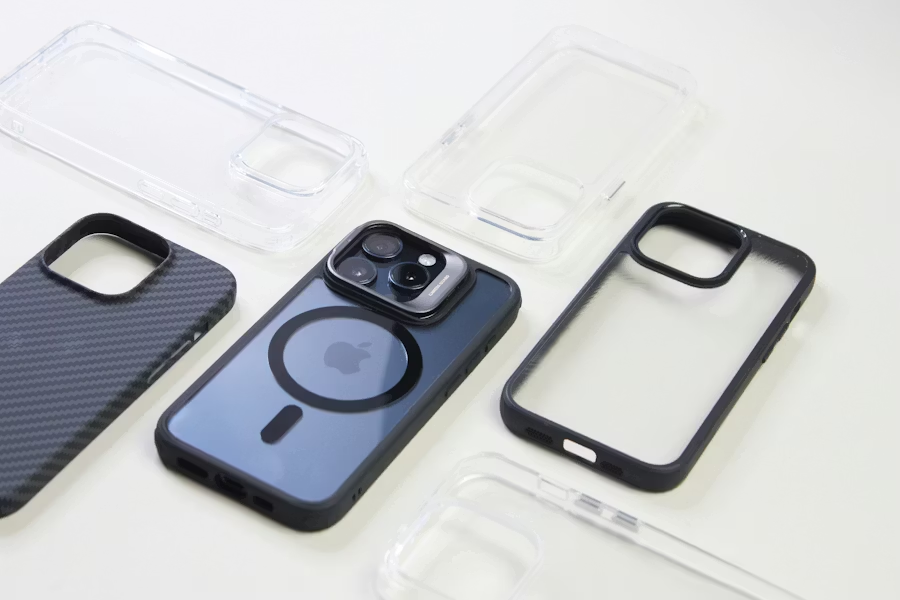
Blank cases are the core consumable that keeps your vending machine printing—every sale pulls one unit from inventory. Choose the right material for consistent dispensing and print quality.
Thermoplastic polyurethane (TPU) is flexible and rubber-like. It absorbs impact well and gives a grippy, non-slip feel that customers notice. For custom printing, plain TPU backs don’t take sublimation directly — they need a polyester or polymer coating on the back surface. UV printing is possible but less consistent than on rigid materials, so factor that into your print workflow if you plan to offer photo-quality designs on these blanks.
In the machine, flexibility reduces cracking risk during dispensing and tolerates minor dimensional differences between batches. This means fewer jams and returns. One watchout: clear TPU can yellow over time, especially in sunny locations. For long-term stock, stick with colored or opaque TPU blanks. Store them packaged in labeled polybags with model and material information, ready for quick restocking.
Stock TPU blanks as your baseline protective option for high-rotation phone models. They’re the reliable workhorse that handles daily dispense stress while still delivering a decent feel and protection level.
Polycarbonate (PC) is rigid and dimensionally stable. It gives cases a slim, premium look and provides an excellent surface for UV and screen printing. Sublimation on PC requires a dedicated coating and blanks that can withstand heat-press temperatures without warping — not every PC blank is built for that, so test before committing.
PC blanks deliver sharp, photo-like prints, which makes them ideal for display-window models that sell the machine’s quality. But the hard surface shows scratches more readily than matte or TPU. Also, pure PC cases offer less drop protection and can crack under heavy impact or in cold environments. They’re best suited for indoor, style-focused vending placements where protection isn’t the main selling point.
Use PC blanks primarily for slim, premium UV-printed lines. Limit them to climate-controlled machines to avoid brittleness issues and maintain that clean, sharp appearance.
Hybrid blanks combine a flexible TPU or rubber bumper with a rigid PC or coated polymer back. That mix delivers a balance of shock absorption from the sides and a high-quality print surface on the back. Many hybrid cases are designed specifically for sublimation: you print the insert, then bond it to the bumper with adhesive after pressing. This design gives you inventory flexibility — keep one bumper SKU per phone model and swap in different printed backs to create variety without multiplying your core inventory.
Hybrids cost more per unit than pure TPU or PC and add an assembly step, but they command higher retail prices as ‘shockproof’ or extra-protection items. Position them as a mid‑to‑premium tier in the machine. They work best on flagship phone models where customers are willing to pay for a more substantial feel and expect that extra durability.
When stocking hybrids, verify that the bulkier size fits your machine’s dispensing channels. Test a few units through the entire vending cycle to make sure the thickness doesn’t cause jams.
UV ink is the engine behind every print. Get the type right, track actual usage, and stock spares.
UV-curable ink hardens instantly under UV light and bonds to plastic, TPU, glass, and coated phone case blanks. Five ink categories matter for day-to-day vending operations.
CMYK UV ink is the workhorse. This four-color set (cyan, magenta, yellow, black) handles full-color photo and graphic printing. Every direct-to-object UV system in the phone case vending space is built around it. When you think "ink consumption," CMYK dominates your usage numbers.
White UV ink solves a specific problem: dark, transparent, or metallic blanks. Without a white underbase, colors look dull and washed out. White ink lays down an opaque layer first, then CMYK prints on top. If your machine supports printing on clear TPU cases or black PC backs, white ink isn't optional — it's mandatory for saleable output.
Varnish or clear UV ink adds finish effects. Gloss coats, matte textures, and spot-highlight details come from clear ink passes. Some systems also support tactile finishes — raised textures you can feel. This ink type only matters if your machine offers special-effect printing as a feature. Don't stock it unless your hardware and customer base demand it.
Flexible UV ink exists for one reason: standard rigid UV ink cracks on bendable materials. TPU cases and other flexible substrates stretch during installation and daily use. Flexible formulations move with the case instead of fracturing. If your vending machine dispenses soft TPU cases, rigid ink creates returns and complaints. Match the ink to the material.
Direct-to-object UV ink is the only category that fits vending-machine workflows. This ink is specifically formulated for printing straight onto the phone case surface. No transfer film. No heat press media. No intermediate steps. The ink hits the blank, UV lamps cure it instantly, and the finished case dispenses. Anything else adds process steps that break the self-service model.
There is no fixed calendar for swapping UV ink. Three variables drive actual replacement timing: how many cases you print, how much ink the nozzles consume per pass, and how aggressively your maintenance cycles run.
CMYK channels deplete faster than white or varnish. Full-color prints pull from all four CMYK cartridges simultaneously, and daily production volume hits those channels hardest. White ink lasts longer because it's only used as an underbase layer, not on every print. Varnish moves slowest — only certain designs trigger a clear coat pass. Operators who track per-color levels instead of total ink volume catch imbalances before a single channel runs dry mid-print.
Daily monitoring prevents revenue loss. Unattended vending systems can't afford surprise downtime. Check ink levels every day through the machine's dashboard or service panel. Keep at least one full backup set of CMYK plus white on hand per machine. When a channel drops below a defined safety margin — typically 15-20% remaining — top it off or swap the cartridge. Don't wait for the empty warning.
White ink demands extra maintenance attention. The pigments in white UV ink settle faster than CMYK pigments. In a machine sitting idle overnight or across a slow weekend, white ink can separate in the lines, head, or reservoir. If your automated system doesn't agitate white ink regularly, you need to run manual circulation or cleaning cycles more often. Skipping this leads to clogged nozzles, banded prints, and a service call that could have been avoided.
Films and coatings preserve print quality; compatibility with case materials and fast curing are non-negotiable.
Standardized, rigid boxes and clear, model-spec labels keep vending machines jam-free and products looking professional.
Folded carton boxes in a single standard size are the most practical for protecting cases, preventing jams, and presenting a retail-ready look. Choose paperboard thickness between 14–20 pt to keep boxes rigid enough for vending spirals and shelves without adding bulk. The box footprint must match your machine’s lane dimensions; typical setups use one primary size and 1–2 height variations for slim and bulky cases.
Tuck-end or auto-lock bottom designs balance fast assembly with dispensing reliability. Avoid complex closures that add packing time. Full-color printing on the outer surface shows phone model, case style, and branding, while the interior can stay unprinted to reduce cost. Pre-printed boxes with a consistent barcode area speed up inventory scanning during restocking and support future automated validation.
Order boxes in bulk—hundreds to thousands—and keep a buffer stock of 1–3 months projected sales to avoid shortages at busy locations. This beats scrambling for emergency orders when a machine runs empty on a Saturday afternoon.
Use clear poly bags (1.5–3 mil PE or PP) inside boxes to guard against dust, scratches, and handling during restocking. If bags are the only packaging, select a thicker, stiffer material tested with your machine to prevent bunching or jamming. Resealable zipper bags add perceived value for premium cases; standard heat-sealed or self-adhesive tops work for most operations.
Labels are critical for instant model and variant identification. Put the phone model name in large, high-contrast text on the front or top face. A barcode or QR code on the side or back supports inventory tracking, scanning at prep, and easier planogram loading in each machine. Thermal-transfer label printers let you create model-specific labels on demand, reducing pre-printed box stock and enabling quick SKU changes.
Maintain a consistent label placement and orientation across all rows so staff and customers always see the same information when looking into the machine. For international locations, add multi-language feature lines or compliance marks while keeping the model name clear and unchanged.
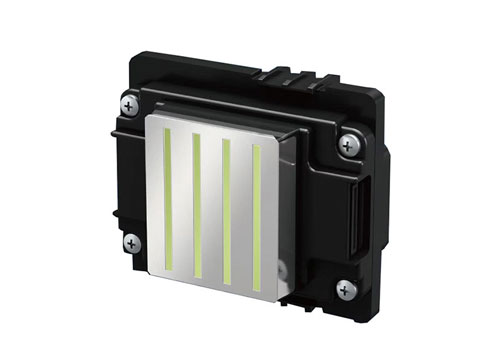
Print heads and cleaning supplies are consumables that directly control print quality, uptime, and operating costs in phone case vending machines.
Print heads in these machines are consumable components. They use inkjet or UV technology, are modular, and you can swap them out in the field without shipping the whole machine back. This design keeps your revenue flowing when a head reaches end of life.
Cleaning covers three areas: the printer itself (nozzles, caps, wipers), the payment hardware (bill acceptors, coin mechs, card readers), and everything the customer sees—exterior, touchscreen, product path. Skipping any of these invites jams, misreads, and ugly print defects.
A mall location printing 30 cases/day can achieve a per-case consumable cost of about $2.08.
| Cost Component | Calculation | Cost per Print |
|---|---|---|
| Blank case | Average purchase price across phone models | $2.00 |
| UV ink | $80 ink set ÷ 2,000 cases | $0.04 |
| Maintenance allocation | $40 monthly supplies ÷ 900 cases | $0.04 (approx.) |
| Total consumable cost | $2.08 |
The basic formula for consumable cost per printed case combines three direct costs:
Total consumable cost per print = blank case cost + (ink set cost ÷ cases per ink set) + (monthly maintenance cost ÷ monthly prints)
A real‑world mall scenario shows how the numbers stack up. Assume the machine averages 30 printed cases per day, roughly 900 per month. Stock standard TPU/PC blanks at a blended cost of $2.00 each. The UV ink set runs $80 and covers 2,000 prints, giving $0.04 per case. Monthly maintenance consumables (cleaning fluids, wipes, printhead care) total $40. Spread across 900 cases, that adds another $0.04.
Plug the numbers in: $2.00 + $0.04 + $0.04 = $2.08 per printed case. At a $15 retail price, the gross profit per case is $12.92, an 86% margin before location overhead. If the same operator buys blanks in smaller, fragmented lots and pays $3.00 per case, the per‑print cost shifts to $3.08. That aligns with the common $3–$4 operating band observed in mixed‑model vending businesses. Volume purchasing and efficient ink usage keep the cost low; small, scattered inventory pushes it toward the higher end.

Dead stock kills margins. Align inventory with phone life cycles, cap slow movers early, and let real-time sales data dictate every reorder.
Stocking cases for a vending machine is not a static exercise. Phone models become irrelevant on predictable schedules. Treat each SKU as a decaying asset. Stock aggressively for current flagships and the previous generation. Taper orders as models age past the 18-month mark. The smartest operators set hard sunset rules. If a specific model sells under 5 units a month for three consecutive months, freeze reorders immediately. You don’t pray for a miracle. You liquidate with a discount or bundle and free up the slot for a case that actually moves.
Ditch the instinct to offer “complete coverage” of niche phone models. Broad variety in a single machine is a trap that creates dozens of one-off sales. Launch each machine with a lean set of high-probability SKUs. Think the top four iPhones and two to three current Samsung flagships. Use a test-and-scale approach. Validate demand with small batch quantities. Only expand when a model proves it can sell at least 20 units a month consistently. For models selling under 10 a month, cap your on-hand stock to a 30–45 day supply. This concentrates your working capital into fast-turning inventory.
Real-time sales data is your primary defense. Machines with cloud dashboards report per-SKU performance. You use this to conduct a strict monthly review. Classify every item into A, B, or C tiers. The A-tier is the top 20% of SKUs generating the bulk of revenue. The C-tier is the bottom, strangling your cash flow. Freeze all reorders for C-tier items. Immediately plan a promotion to clear them. Set automated alerts for any SKU with zero sales over 30 days. It’s a candidate for physical removal at the next service visit.
You must enforce inventory caps and reorder points by model. Calculate the average daily sales per SKU over the last 60 days. Set your reorder point based on that velocity plus supplier lead time. Don’t overbuy safety stock for slow movers. For a niche model, keep safety stock near zero. Cap on-hand inventory to 1 to 1.5 times the expected 30-day sales for moderate movers. Slash that to 0.5 times for anything classified as a slow mover. If you can’t sell it quickly, you shouldn’t store it inside a profit-generating machine.
Location diversification is a tool, not a solution for bad buying. A dead SKU in a university machine might sell in a transit hub. Centralize slow-moving inventory in a small storage area. During each service visit, pull underperforming SKUs and redeploy them to machines where similar models show stronger sales. Every quarter, purge dead slots by consolidating lazy stock centrally. A dead slot in a high-traffic machine costs far more than the case value.
For on-demand printing businesses, design dead stock is a bigger threat than model obsolescence. Pre-printed artwork tied to micro-trends becomes landfill within weeks. Lean heavily on blank cases. Print after the customer pays to avoid pre-committing inventory to a specific design. Treat your digital design catalog like seasonal SKUs. Introduce small waves of new art. Retire any design that falls below a minimum conversion rate within 60 days.
Physical organization hides waste. Apply FIFO religiously in your storage and inside the machine bays. Newer stock goes behind older stock. Use color-coded labels for aging models close to discontinuation. Audit boxes that haven’t been touched in three to six months. Those boxes are your dead stock, sitting in plain sight. Catch them early enough, and you can discount or redeploy them before they become a total write-off.
Stop using a one-size-fits-all planogram. A mall location packed with mid-range Android cases is a dead stock generator. Build a device profile for each location. Limit the machine to 8–12 models that match local ownership. Test any new SKU in a pilot location before rolling it out network-wide. This prevents a single bad design from poisoning multiple revenue streams.
Clear emerging dead stock fast. Automatic markdowns of 20–40% inside the machine will dislodge slow sellers. Bundle a struggling model with a new iPhone case to move dated inventory. If a machine in a low-traffic area has an accumulation issue, physically move the stock to a high-traffic location with a clearance price. Speed of liquidation trumps margin recovery on obsolete units.
You manage dead stock risk before you even buy. Negotiate supplier terms that allow small minimum order quantities. Find vendors offering frequent restock options instead of forcing you into massive bulk orders. Push for buy-back or exchange programs for unsold inventory when models become obsolete. Locking into long-term bulk contracts for manufacturer-locked supplies is a liability unless your data guarantees the volume.
Formalize SOPs to enforce discipline. On each service visit, tag any SKU with no sales since the last check for removal. Run a monthly velocity report. Explicitly decide what scales up, what scales down, and what gets discontinued. Quarterly, retire the bottom 10–20% of designs by sales and completely remove model families that are three generations old. Without these cadences, dead stock accumulates through sheer inertia.
Scaling to multiple machines multiplies the risk. Use vending management software to track stock across every machine in real time. Aggregate network demand before placing orders. Implement a standardized planogram with a core set of A-tier SKUs in every machine, while allowing 10–30% flexible slots for location-specific items. Maintain a network-wide dead stock dashboard. A SKU that is universally underperforming requires a network-level clearance, not a localized markdown. This systemized approach keeps capital focused on fast-turning, high-margin inventory.
On average, a phone case vending machine uses 0.8–1.0 ml of UV ink per printed case, with a total ink cost of approximately $0.05 per case. A 2,000 ml ink system can print 2,000–2,500 cases. Ink consumption varies based on design coverage, printer model, and ink type. Darker, full-coverage designs use more ink than simple light-color prints. Since ink is a minor cost relative to the blank case, it has minimal impact on overall margins.
Stocking depends on traffic, phone model popularity, and machine capacity. A general baseline is 8–15 cases per phone model. For a single machine, total inventory typically ranges from 120–200 cases in low-traffic locations to 400–800 cases in high-traffic venues like airports. Custom-print machines using blanks may stock 300–600 blanks, with heavier depth for top-selling models (e.g., latest iPhones and Samsung flagships). Adjust based on real-time sales data and restocking frequency, and plan extra stock during new phone launches and holiday seasons.
You can source consumables from several channels. The most reliable is the machine manufacturer, which supplies approved blank TPU+PC cases (around $1.30 each) and compatible UV inks. Specialized phone case vending vendors also bundle consumables with their systems. Once compatibility is confirmed, you can source blank cases and packaging from wholesale B2B suppliers to reduce costs. For critical components like printheads and inks, stick with the manufacturer or authorized distributors to maintain print quality and warranty compliance. Start with the official channel and gradually test alternative suppliers as volume grows.
Operators who treat consumables as an afterthought pay the real price in downtime, refunds, and machine performance. The $2.08 per-print standard we detailed—built on approved blanks, matched UV ink, and disciplined maintenance—is the only way to protect 86% margins from hidden risks. Generic substitutes may shave a few cents, but they invite jams, bad prints, and service calls that destroy your location’s reputation.
Don’t leave your stock to chance. Begin with a phone case vending machine manufacturer approved starter kit of blanks, ink, and cleaning supplies to validate compatibility and print quality. Contact your equipment partner today to lock in volume pricing and build a reliable supply chain before you open your first machine.
Share your business vision with us. Our automated retail experts will craft a tailored strategy and a comprehensive profitability report to unlock your next revenue stream.